
Why QLab needs reliable hardware in live shows
Use QLab for long enough and sooner or later you’ll have this moment: you press GO and nothing happens, because QLab wasn’t the app in front.
Why QLab doesn’t respond to the space bar
macOS likes to move windows around, pop up system dialogs and bring apps to the front. Keystrokes only ever go to the program that currently has focus.
That isn’t a bug in QLab. It’s simply how an operating system works, and in a live show it’s dangerous. If you’re careful and have prepared the machine well, it rarely happens. When it does, it’s usually at the worst possible moment.
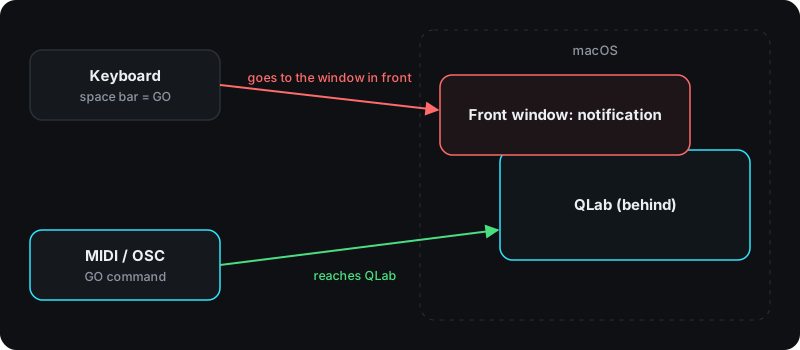
Cheap USB remotes have the same problem
USB keyboard emulators, the typical cheap remotes from AliExpress and eBay, are usually inexpensive and don’t look bad at all. Unfortunately they don’t solve anything. Most of them send the same key codes as an ordinary keyboard:
- space bar for GO
- ESC for stop
- arrow keys for navigation
So they have exactly the same problems as the keyboard: they only work when QLab is in front. On top of that come key bounce (one press fires twice), loose sockets and vague key travel.
Or you have to install badly translated software or drivers from an unknown developer. With security as serious a topic as it is today, we really wouldn’t do that. We don’t want to put anyone in a box or speak badly of developers from the Far East. We just think that in a professional setting you should know what you’re using and who is behind it. Otherwise we don’t feel good about it on a show computer.
What a QLab controller needs to do
So we wanted a controller that doesn’t work like a keyboard, needs no software installed and therefore works regardless of the operating system. We didn’t want a Stream Deck. We wanted something that triggers QLab reliably every time, whatever macOS is doing. That became the FrenschPress.
It uses MIDI, needs no setup and no driver, is sturdy and feels the way we want a controller to feel at FOH. And when we need a more complex setup with OSC, it does that too. What else to set up on the computer is in our QLab show computer checklist.