
Using OSC to drive two QLab systems redundantly
Redundancy is simply part of live work these days, whether it’s a theatre repertoire, a corporate show or a dance production. Nobody wants to rely on a single computer staying stable forever.
So we often run two QLab systems:
- Host: the active playback machine
- Backup: identical project, identical state
Both systems run at the same time, and if the host fails, the backup takes over seamlessly.
For this redundancy to really work, both systems have to receive exactly the same commands, and from a common source. If you let the main machine trigger the backup, say via OSC from a cue, the backup’s trigger dies along with the main machine. People in the QLab community point this out again and again.
Why OSC suits redundancy so well
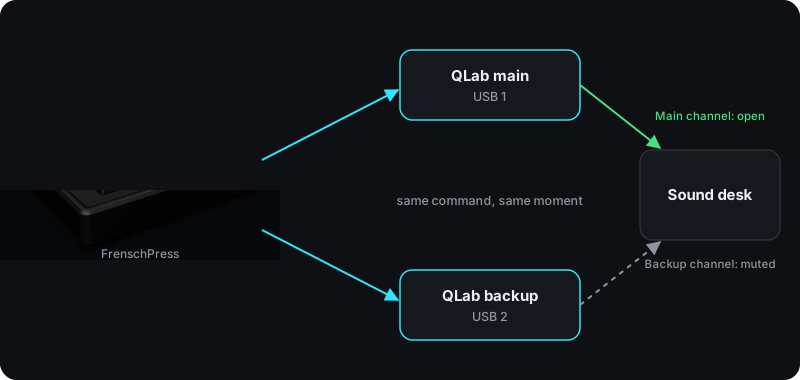
With the right controller you can do this over MIDI too. The FrenschPress, for example, has two USB ports and sends every command to both computers at once, with no network involved. That works when both machines are at FOH. For redundancy, though, Open Sound Control has further advantages:
- The backup machine can be somewhere else.
- OSC sends very clear commands. The backup system simply runs along and takes over seamlessly if the main machine drops out.
With OSC, redundancy is surprisingly simple: one trigger → two computers → the same reaction.
Why a hardware controller makes this so much calmer
For years we ran redundancy through software triggers, Companion or QLab’s workspace follow feature. That works well, but it’s always one layer more than necessary.
A hardware controller that sends OSC straight to both systems has three clear advantages for us:
- We can see whether the command arrived. The FrenschPress shows it clearly through the key feedback.
- Both systems are always in sync. There’s no wrong cue, no navigating and no “where are we right now?”.
- The same thing happens on both computers. You press GO and both fire.
Especially in hectic situations, at very important client events, or when everything is complicated anyway, a backup system running alongside is enormously reassuring.
What the setup looks like
Very simple:
- two QLab computers
- both on the same network
- FrenschPress powered over USB (5 V)
- the FrenschPress sends OSC to the network
- the QLab host and the backup get their commands from the FrenschPress
- both projects always sit on the same cue
We press GO → both computers fire. If the main machine fails, we just open the backup channel on the sound desk and mute the main one. Everything else carries on as normal.
You can also do the switching in QLab itself. In the Main or Backup cookbook, Figure 53 shows how to use Override Controls to mute the outputs of whichever machine isn’t active. There too, the recommendation is to drive both Macs from one controller that sends to both. The example was written for QLab 4 and needs small changes for QLab 5.
You don’t have to set up anything complicated: no extra layers, no linked workspaces, no servers following each other. You simply trigger two systems at once.
That’s why OSC is often the simplest way to do redundancy, and why we built it straight into the FrenschPress.