
Timecode in live production: MTC, LTC and Art-Net
Timecode is a running clock in the format hours:minutes:seconds:frames. Devices that all read the same clock can do the right thing at the same moment: lighting, sound, video and effects. That’s useful for shows that run the same way every time, such as dance to a playback track or shows locked to a fixed soundtrack.
LTC, MTC and Art-Net timecode
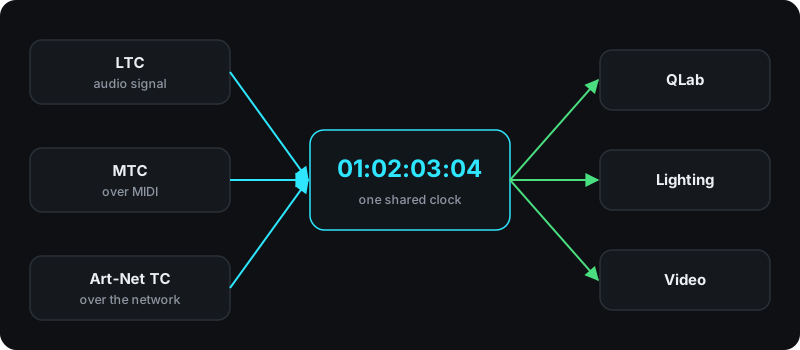
LTC (linear timecode) is an audio signal. You distribute it like sound: over line cables, stage boxes and audio interfaces. It’s often casually called “SMPTE”, after the organisation that maintains the standard.
MTC (MIDI timecode) runs over MIDI. The time is sent in quarter-frame messages: eight of them together make up one complete time value. When the time jumps, the sender transmits a full-frame message with the new position.
Art-Net timecode carries the time over the network, in the same protocol many lighting desks already speak.
Frame rates
Common rates are 24, 25, 29.97 and 30 frames per second. Sender and receiver must use the same rate. If they don’t, cues fire at the wrong point. In Europe, video often runs at 25 fps.
Timecode in QLab
QLab can be driven by LTC or MTC. You enable timecode for a cue list, choose the source and format, and give individual cues a start time. Two settings matter:
- Freewheel: a window of up to two seconds in which short dropouts are ignored. According to the QLab documentation such dropouts are common, especially with MTC.
- On Stop: what happens when timecode stops. Cues can stop, pause or keep running.
The QLab documentation recommends timecode mainly when a production already runs on it, or when a device understands nothing else. For regular theatre with GO on cue, MIDI Show Control or OSC is usually the better choice.
Common problems
- Wrong frame rate: cues land slightly off, and the offset grows over time.
- MTC dropouts: MIDI interfaces often aren’t built for the data load. The QLab documentation warns explicitly that many inexpensive MIDI interfaces aren’t suitable for show-critical use.
- No single source: two devices each generate their own timecode, and nobody notices until the show.
- Rehearsing from the middle: when you jump into the middle, every device has to pick up the new position. In QLab, the On Start setting decides whether skipped cues are run.
Timecode without a computer
Our MIDI and network controller has a timecode clock built in. It generates MTC at 30 fps, and Art-Net timecode if you want, and passes timecode between USB and the network. On a timeline inside the device you place cues at timecode positions that trigger macros, with no computer at all. We’ve announced a dedicated dongle for LTC. It receives 24, 25, 29.97 and 30 fps.